Tag Archive - programming

Getting DPad Input from Thumbsticks in XNA – The Right Way

If you want to simulate 4-way DPad movement with the left or right analog thumbstick in XNA, my advice is to never use Buttons.LeftThumbStickUp, etc. This is because the default behavior doesn’t take into account the dead zone for the stick, which varies from controller to controller.  (The dead zone is the location near the center of the stick position, where it won’t send any movement value to the Xbox.)

You might test on a controller with a large dead zone and have no problem, then someone else will play your game with a very small dead zone, and they will find the control “sticking” in that direction.  I’ve had some controllers where the dead zone was so precise, I could have my thumb off the joystick and it would still be transmitting a tiny movement value.

I suggest adding a large dead zone, to make sure you only get simulated DPad input for large, deliberate movements of the analog stick.  Here’s some code that works for me, adjust as necessary to fit your control scheme:

static Buttons GetThumbstickDirection(PlayerIndex player, bool leftStick)
{
    float thumbstickTolerance = 0.35f;

    GamePadState gs = GamePad.GetState(player);
    Vector2 direction = (leftStick) ?
        gs.ThumbSticks.Left : gs.ThumbSticks.Right;

    float absX = Math.Abs(direction.X);
    float absY = Math.Abs(direction.Y);

    if (absX > absY && absX > thumbstickTolerance)
    {
        return (direction.X > 0) ? Buttons.DPadRight : Buttons.DPadLeft;
    }
    else if (absX < absY && absY > thumbstickTolerance)
    {
        return (direction.Y > 0) ? Buttons.DPadUp : Buttons.DPadDown;
    }
    return (Buttons)0;
}

Unity and MonoGame

There are plans to port my games to other platforms.  Windows is easy because my games already run on Windows.  XNA works great, you just have to remove the Xbox-specific stuff (related to the Guide and Gamer Services) and you’re good to go.  Unfortunately there’s no turnkey solution for the other platforms, so the porting process is going to be… more of a real port.

Today I investigated two options for this task.  First was MonoGame, basically a substitute for the XNA libraries that supposedly runs on Linux, OSX and iOS.  Sounds too good to be true, and unfortunately at this stage, it just doesn’t look ready.  To get a game to compile with it, I had to remove tons of code due to compatibility errors and missing API calls.  Even once I got through the compile errors and runtime errors, the game never managed to draw anything (though it could clear the screen to a specific color).  Plus the startup time for the application was about 5x compared to native XNA… so maybe there are workarounds, but so far it just doesn’t seem viable.

Unity is the other option.  Now a port from XNA to Unity is a major undertaking.  I got some serious protips from Brad who helped me through all those tiny things that trip up newcomers, and probably saved me a day’s worth of Googling.  The good news is I have a friend who knows Unity whom I can harass with my questions.  The bad news is that there will be some serious translation work to get my code from XNA to Unity.  I was hoping to put everything (my whole game) in one game object and let it draw itself, since I don’t need any of the high level features of Unity.  Just give me a surface to draw to.  Unfortunately it’s not so simple… exactly what this will take is something I’ll be discovering over the next few days.

It’s Good To Know Even The Classics Struggled With Collision

Staging Code Tasks on Notepad

I’ve tried dozens of organization apps and software, and Notepad is still my favorite.  Its biggest drawback used to be accessibility–having to keep the text files with you if you work on more than one computer.  DropBox fixed that.

I tend to keep a text file of tasks so I know where to pick up tomorrow.  It’s vital that one of those tasks is immediately accessible and not too abstract.

  • OK: “Fix overlapping blocks collision bug.”  
  • Better: “Reproduce overlapping blocks bug by building a test room.”

Today was one of those coding days where every fix reveals yet another fix that’s needed.  My initial task list was about 15 items but I probably checked in over 40 changes today.  It’s frustrating to have done so much more work than I thought was needed, and still not be where I thought I would be today.  But, I’m still generally on track, and things had moved forward a lot.  It could be worse, I could have attempted a major refactoring and broken things so badly that I had no choice but to revert to the last update in source control.  It’s happened, but not today.  Today was just a steady unraveling of long-dormant bugs and tiny features that insisted on their existence at the last minute.

Notepad kept me sane.  Minor bugs kept cropping up, and I would just jot them into the text file.  As I fixed them, I would cut them out and paste them into the source control check-in log.  I’m down to about 3 right now, nothing major, and if I weren’t superstitious about this sort of thing I would say I’ve totally got it handled tomorrow.


Today I finally got my act together with version control.  This is something I had put off for way too long, and with my venture into PC ports, I think it was finally time to learn what branching and tagging are.

In a nutshell, branches and tags are like copies of the project that don’t take up extra space like they would in a normal file system.  They’re useful for storing release versions and for testing new features.  They’re like the save games of the world of coding–you want to create a new one before a boss fight.

For those of you who don’t use version control, get Subversion and learn the best practices.  Need a host?  Code Spaces has done me well.

With that handled, I got to put in a bit more time on porting Soulcaster II to PC.  I uninstalled Visual Studio and XNA Game Studio on one of my desktop computers so it could act as a testbed for end user machines.  Still have to work out some bugs but things are set up well for it now.

Squish Detection in Platformers

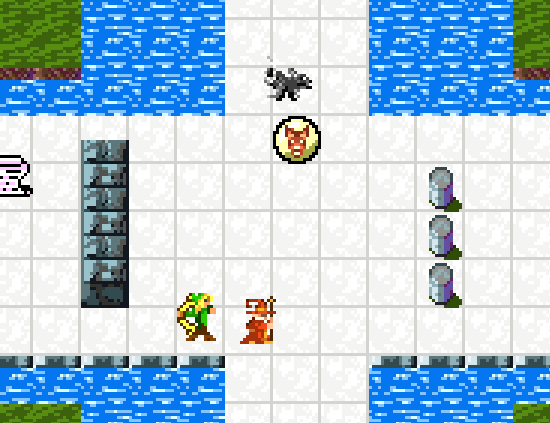
I’m amped.  I started writing a post on game production and teamwork versus working solo, but it’s just not something I can do tonight–draft saved.  Right now I just have to celebrate the squashing of an ancient, pernicious demon bug from hell in the Escape Goat code.  Could it even be called a bug?  It never even revealed itself in that mortal form.  It stayed for weeks, months even, as the Feature that Wouldn’t Be.

It was creature squish detection.

Here’s the situation in a nutshell:  If a block falls on you, or you get mashed between two moving walls, you get squished and have to restart the room.  Makes sense.  And detecting this is easy enough: if after resolving all collisions (clipping creatures to the edges of walls) a creature is still intersecting with a wall, you’ve got a squish happening.  That means one wall clipped the creature into another wall and it can’t be pushed away.

There was a problem with this.

Getting squished by a single pixel of falling block was annoying.  So was getting crushed when you were only barely inside a moving wall.  Come on, that should just nudge you out of the way… it’s barely grazing the goat’s tail!  You can’t make me restart this whole puzzle for that.

But… I also can’t take out squishing.  What if you get crushed by a block, do you just get to clip through the top of the block?  Or through the floor below?  That’s no good.  Squishing machines are a great hazard device in this game.  I’m not giving that up.  There has to be a balance… you need to be able to tolerate a few pixels of squishing and “nudge” the player out of the way in those situations.

I tried about 5 different methods of handling this.  And just a couple hours ago, after intense frustration and perseverance, I found the solution:

  1. Do all clipping of creatures to walls and world obstacles
  2. If any creatures are still intersecting with walls, start a crush timer on that creature, which lasts for 5 frames
  3. If the crush timer reaches 0, kill the creature.  (It took too many frames to resolve it to a safe position.)
  4. If the creature is not intersecting, store its position as a “safe position”
  5. If the creature is no longer intersecting, reset the crush timer, and compare its new position to the safe position that was stored before.  If the distance is greater than the squish tolerance (I set it to 5 pixels in either axis), kill the creature.

Essentially, give the game 5 frames to resolve a safe position for the creature after being crushed.  If this new position is too far from the start position, well, I can only be so forgiving.

Top: Direct hit, kill. Bottom: Gentle nudge out of the way.

When you face a feature from hell, stick with it, draw pictures, and try solving it from a variety of angles.  You’ll get it eventually and it’ll feel great.

The Specific Solution – Thoughts on Jonathan Blow’s “How to Program Independent Games”

I don’t have a CS degree. I learned programming from books, starting with QBasic in high school, then C, then enough C++ to scare me off programming for a few years, and finally the siren’s call of C# has lured me back.  My education is lacking in some areas, so I try to make up for this by reading as much as possible.  A couple of my favorite books are Object-Oriented Design Heuristics and Code Complete.

As part of my ongoing research, I listened to Jonathan Blow’s talk at Berkeley last month.  It was eye-opening, and packed with great advice, but more importantly, it was reassuring.

After listening, I felt less ashamed of my “shooting from the hip” approach to programming.  I don’t write formal specs, I just code incrementally and refactor as needed.   When the project is done, parts are pretty messy.  There are always a few things I would have done differently if I had time to undertake a major refactoring, but hey, the game works, and it’s done.

Why was this talk reassuring? Jon is going out on a limb to challenge some computer science orthodoxy.   Despite my not having taken classes in programming, I’ve been exposed to plenty of this in books and online discussions.  There is such a value placed on the Right Way to program something that the cost to program it is often overlooked.  The Right Way can be wrong.  The heresy! And he’s right.

Here are the main points I took home from the talk:

1. A generalized system is usually worse than a specific system.

There are times when I’m programming a new feature, and an angel on my shoulder says, “Hey, you’ll need this for more than one thing.  Let’s make it just a bit more abstract, and not so closely tied to this one class.  Remember loose coupling?  Eat your peas and carrots.”

I’ve heard to this practice referred to as “gold plating” … adding something you MIGHT need later, but don’t need NOW.  The advantages of an abstract, general solution?  I’m not sure, but it seems to look nicer.  The cost? a) time to think about potential other situations to accommodate, b) more time to code these solutions, c) more cases to test for bugs, d) the method now has a name like ProcessInput() which gives no clue as to what it does.

Jon responds to one of the comments on his post on the talk with: “Why don’t you just, you know, let the two objects communicate?”  I need a bronze engraving of this.

At some point during development of Escape Goat, I decided it would be good to have two projects: the game, and the “engine.”  All the low-level stuff like sprites, player input, and audio could go into the engine, and the stuff specific to the game, well that belongs in the game.  What a mistake.  Now I have all kinds of interface definitions just so the engine can operate without knowledge of the game’s types.  Which means updating everything in multiple places for every interface change.  (Lately, I have been discretely smuggling classes from the engine into the game project.)  The costs have been real.  The benefits?  Who knows, I can’t think of one writing this here and now.

Imprinted in my mind now: Start with the simple, specific solution, no matter what coupling this might introduce. And if enough parts of the system use this solution, think about refactoring it into something general.

You can always go from two similar specifics to one general. It can wait.

2. Don’t optimize early on.

37Signals likes to say “Ignore the details early on.” I think this is one of those details. Wait until you have performance problems, then find the parts of the code that are slow and work on them for a while.

I have a more positive Escape Goat anecdote for this one.

Case in point: Garbage collection. My current build generates tons of garbage. I haven’ t even profiled it, but it’s going to be nasty if I do.  Each room change builds a new copy of everything in the room, and most room actors are composites of some very complex types. When a TNT keg explodes, every debris particle gets freshly minted, then discarded 30 frames later to be gobbled up by the GC. Horrible practice, right? I should be pooling and reusing these, right?  Nah, I’ll pass.  There is zero noticeable performance hit, because my game is a puzzle platformer with a few hundred actors on-screen, not a bullet hell shmup with thousands. The pooling system could have taken me a week, and now I get to spend the week on other stuff.

3. Use straight-line code instead of function calls for single instances.

This one hits close to home because one of my favorite programming principles used to be, “When you’re going to add a comment describing what the next bit of code does, instead make it into its own function, with the comment as the function name.”  I loved this principle so much that it’s my only programming tip tweet.

And… I’m not letting it go just yet.  I still think this is valuable when designing new code, because in the function call you decide what gets passed in, and it narrows the scope of the problem to a few key variables.  The cost of doing business this way is that you end up with a bunch of small functions that are only used in one place, and you have to bounce around when stepping through code.

My compromise?  I’ll keep doing this, but after the code is working, I’ll re-inline those functions back to the parent method.  I like solving problems in the safety of a smaller scope, but once it’s working, it’s back to the Mega Function for you.  Pro Tip: You can even simulate the function call with an opening curly brace to open a new scope.

Bottom line: There is a beauty in some ugly code, when you can see the time saved by not handcrafting the ideal, elegant solution.